

A reverse proxy makes a self-hosted application easier to reach. That is its attraction—and exactly why it should not be mistaken for private remote access.
A memorable hostname, a valid certificate and a neat login page can look reassuring. None of them, on its own, answers the important question: who can reach the service, and who is allowed to use it? Decide the audience first. Then choose the path.
What the proxy actually does
An HTTP reverse proxy receives a request and forwards it to an upstream application. It can route by hostname or path, terminate TLS, and apply explicitly configured controls. The NGINX reverse-proxy guide describes that request-forwarding behaviour and how request headers are handled.
Those capabilities are useful whether the proxy is public or private. A proxy is not inherently insecure, nor inherently an authentication system. Access restrictions, an identity-aware gateway or application login must be deliberately configured. TLS protects the connection; a certificate is not a list of people permitted to use your application.
For a public blog, internet reachability is the point. For a hypervisor console, backup administration page or container manager used by two people, making the entry point reachable by everyone is usually unnecessary.
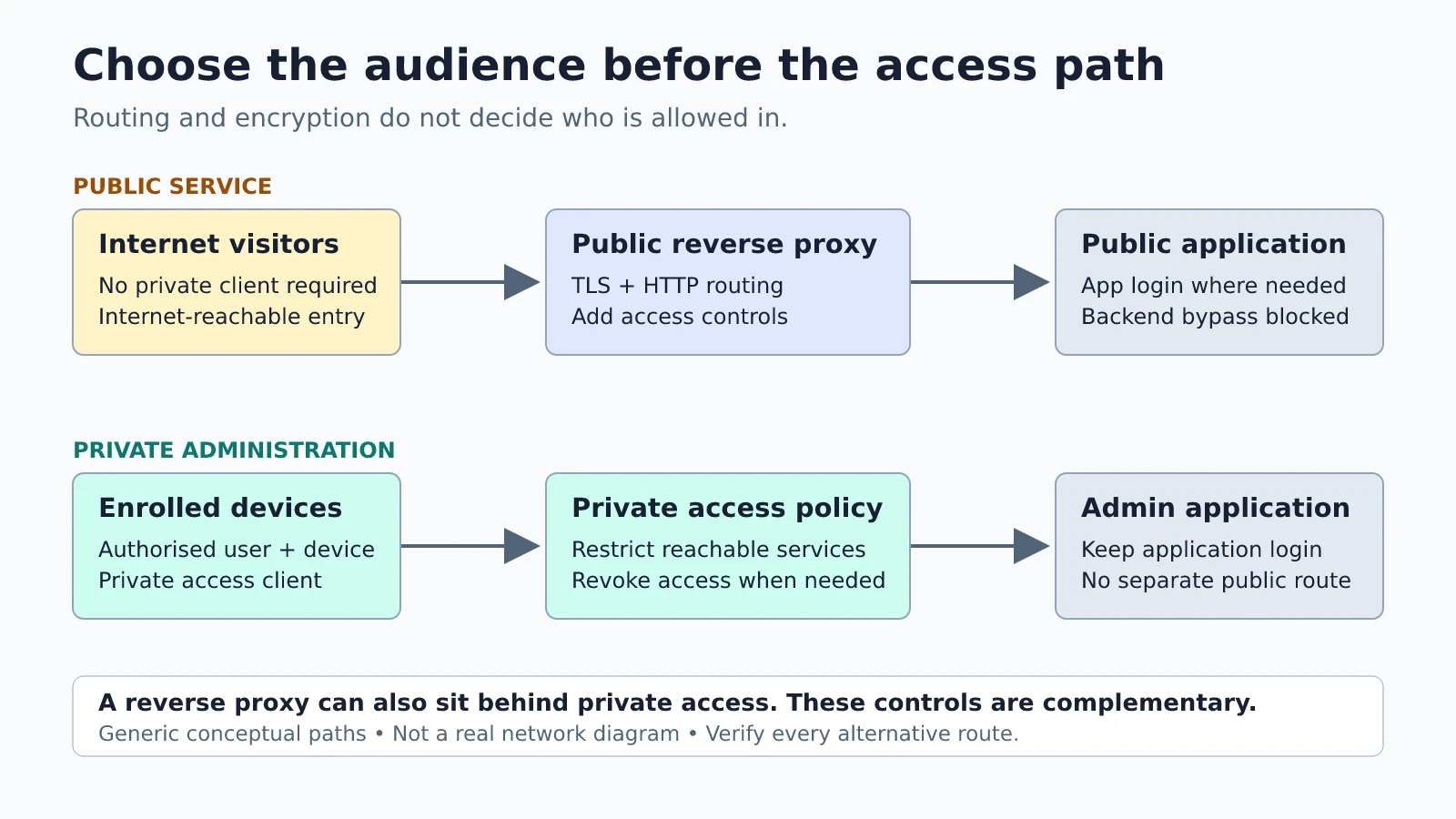
Private access changes the starting audience
A VPN or identity-aware private-access service can restrict the devices and users able to reach an application. The exact controls differ: a conventional VPN can grant broad network access unless restricted, while other designs grant access to specific services. Neither label guarantees a least-privilege policy. Inspect the rules.
This is not an either/or choice with a reverse proxy. You can put a proxy behind private access, keep friendly names and HTTPS, and limit access to an enrolled device or authorised identity. Keep application authentication too. An authorised network connection should not automatically become administrator access.
The tradeoff is friction and another dependency. Clients may need software, device enrolment and a working identity provider. A lost phone or unavailable control plane can complicate recovery; exact offline behaviour is product-specific. Before relying on a private-access layer, document a separate, tested recovery route appropriate to your threat model.
A tunnel can still be public
“No inbound port forwarding” is not the same as “not available from the internet”. An outbound tunnel can publish an application through an internet-reachable endpoint. Hiding the origin address may be useful, but does not make the published application private.
Tailscale provides a concrete distinction. Its documentation describes Serve as sharing a local resource within the tailnet, while Funnel makes a resource available to the public. The Serve documentation also warns that the same port cannot be used for both simultaneously: the most recent configuration determines whether that port is private or public.
This is an example, not a recommendation to change products. For any tunnel, ask whether a new visitor needs an enrolled client, must authenticate at an access gateway, or can simply connect to a public URL. Names such as “secure tunnel” describe transport, not necessarily the audience.
Close the bypass, not just the front door
An identity gate is useful only if users cannot sidestep it. A backend may still be reachable through a published container port, an old hostname, a router rule or another listener. IPv4 and IPv6 reachability can differ. Removing a DNS record is not an access-control rule.
Map every intended route to the service, and restrict backend reachability to the components that need it. The right mechanism depends on placement: loopback binding, an isolated container network, host firewall rules or network policy can all be relevant. Do not copy a generic firewall recipe onto a host whose management path you have not documented.
Forwarded identity headers require the same care. An application must not trust an arbitrary client-supplied header as proof of identity. Trust only a correctly configured gateway, have it sanitise the headers, and prevent direct access that bypasses that gateway. Also distinguish the client-to-proxy connection from the proxy-to-backend connection: TLS on the public listener does not automatically encrypt the upstream hop.
Authentication is still application work
A public service with accounts needs more than a proxy. Use maintained authentication, protect credentials in transit, and enable MFA where available and appropriate. The OWASP Authentication Cheat Sheet covers TLS, multifactor authentication, login throttling and re-authentication for sensitive actions.
Private services benefit from these controls as well. A compromised enrolled device or stolen session remains a risk. Keep recovery codes and access credentials in an appropriate secret store, not in a shared diagram or a configuration example. Know how to revoke a device and recover an account before those procedures become urgent.
A small reachability experiment
The following is a proposed exercise, not a report of a tested installation. Use an existing harmless test service you own, with no sensitive content. Do not expose a production admin interface just to perform the exercise.
- Write the expected audience: public visitors, selected users, or enrolled devices only. Record the intended URL and any authorised alternate route.
- Test from the intended client: confirm reachability, then confirm the application still requires its expected login or authorisation.
- Test from outside the allowed path: use a device or connection you control with private access disabled. Record whether access is refused at the network layer, denied by the gateway, or reaches the application. Mobile data is one possible vantage point, not proof about every internet path.
- Check bypasses: inspect configured listeners and published ports, and test only your own known alternate routes. Include IPv6 if enabled.
- Record the result: date, client vantage point, expected outcome and actual outcome. Do not put tokens, cookies or passwords in the note.
My default is simple: publish services that genuinely need a public audience; keep administrative surfaces behind narrowly scoped private access when practical. Use a reverse proxy for routing, TLS and explicitly configured policy—not as a comforting synonym for privacy.