

A container restarts after a power cut. Its web page loads, the logs look ordinary, and the application begins writing files. There is just one problem: the external disk that normally holds those files has not mounted yet.
The application may now be writing into a directory on the host’s root filesystem. Later, the intended filesystem mounts over that directory and those earlier files disappear from the normal view. Nothing magical happened to the data; the same pathname now leads somewhere else.
This is a generic failure scenario, not a report of a test or incident. It matters whenever a Linux Docker host uses USB disks or network storage through bind mounts. The useful question is not just “does this directory exist?” It is “which filesystem is behind it, and is it ready for this workload?”
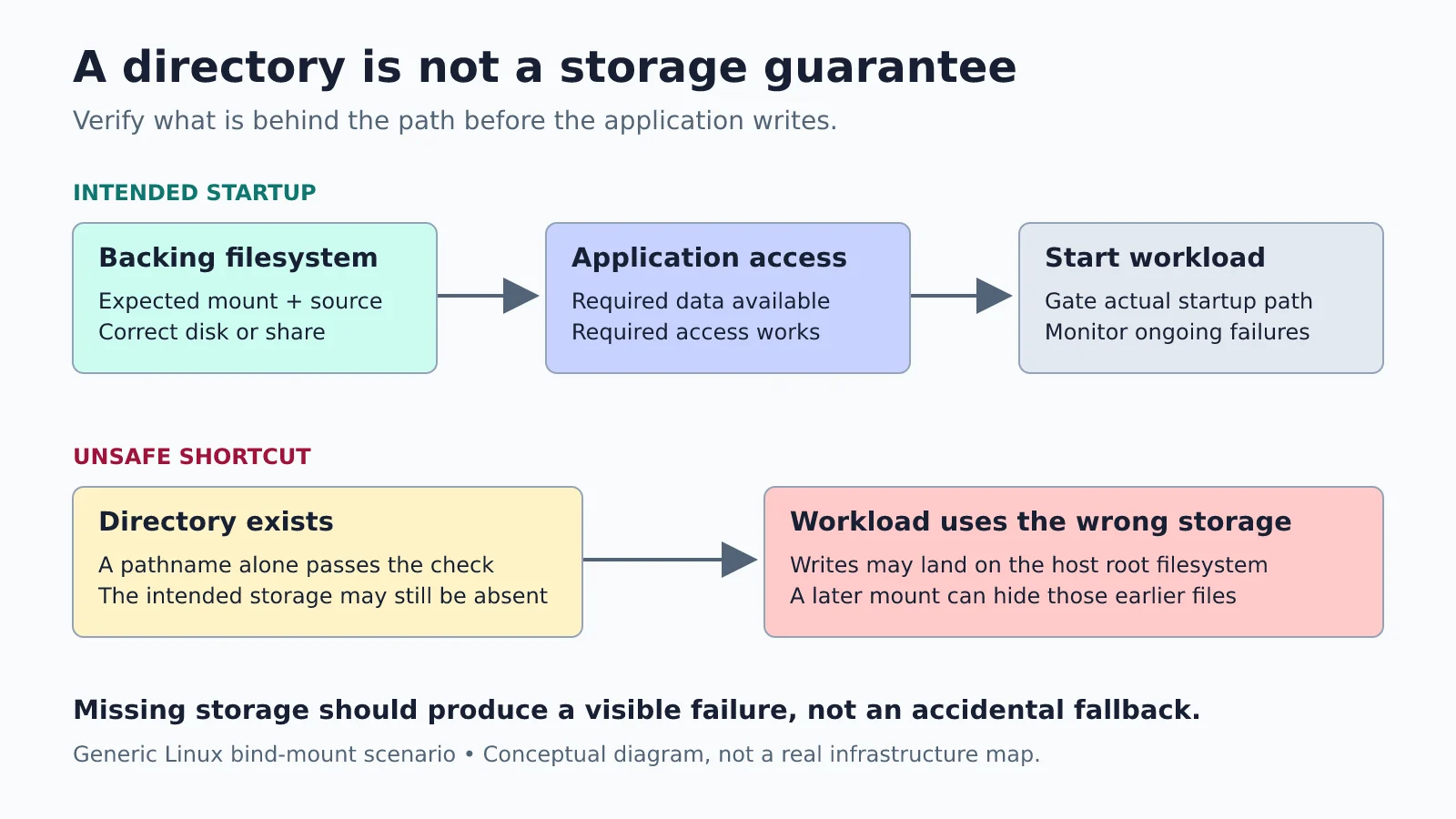
A bind mount is a path, not a storage guarantee
Docker bind mounts expose a host path inside a container. They do not, by themselves, prove that the host path belongs to the disk or network share you intended. Docker’s bind-mount documentation also makes an important distinction: the CLI --volume form creates a missing source directory, while --mount fails by default when the source is absent.
Compose has a similar footgun. Its short volume syntax creates a missing host directory for a bind mount. The long syntax lets you disable that behaviour:
# Illustrative service fragment, not a complete deployment.
volumes:
  - type: bind
    source: /mnt/example-storage/app-data
    target: /data
    bind:
      create_host_path: false
That is a useful guard against a typo or missing directory, not a complete readiness check. If the directory already exists on the root filesystem, this setting does not verify its storage identity. Nor does it verify permissions, free space or a remote server’s responsiveness. The example path is deliberately generic.
Separate the two dependency graphs
An application stack might require a database before the web service starts. The host has a different dependency graph: a network connection, a mount unit and the intended filesystem before a storage-dependent application starts.
Compose depends_on handles relationships between services in the Compose application. With condition: service_healthy, it can wait for a dependency’s healthcheck during Compose startup. It is not a declaration that a host NAS mount is ready. See Docker’s startup-order guidance.
Also distinguish a Compose-driven deployment from Docker Engine restarting existing containers under their restart policies. Do not assume a Compose-time check will be re-run every time the daemon starts an existing container. The guard must sit on the path that actually starts the workload.
Put the storage gate in the right place
On a systemd-based Linux host, RequiresMountsFor= adds requirement and ordering dependencies on mount units needed to access specified absolute paths. That gives a service an explicit relationship with systemd-managed mounts, rather than relying on a hopeful delay.
It still needs a real mount configuration. If the path only belongs to the root filesystem and no separate mount is configured, the directive cannot invent the missing disk. A successful mount also does not prove that the application can read and write its required data.
Choose the scope deliberately. Gating the whole Docker daemon can protect containers with automatic restart policies, but one unavailable share could then prevent unrelated containers from starting too. Gating a dedicated application service narrows that impact, but only works if no other mechanism starts its containers first. Inventory restart policies and other managers before choosing either approach.
There is no universal drop-in file here: rootless Docker, Docker Desktop, automounts and different network-filesystem setups need different handling. A startup gate is also not a continuous availability guarantee. A disk or server can fail after the application starts.
Check identity before checking health
For a local filesystem, record the expected filesystem identity, not merely a convenient device name that may change. For network storage, record the expected server/export or share, the filesystem type, and the application’s required access. Keep credentials in the appropriate protected credential mechanism, not in a dashboard label or published configuration.
A sentinel file can provide an additional sanity check if it is deliberately created on the intended storage, but it is not a substitute for identifying the mount: a stray copy on the root filesystem could fool a simple existence check. Use multiple small assertions rather than one confident-looking test.
A read-only experiment for the next quiet afternoon
This inspection exercise is proposed, not tested here. It does not require unplugging a disk, restarting Docker or changing a production mount.
- Choose one storage-dependent container and inspect its mounts with
docker inspect --format '{{json .Mounts}}' example-app, replacing the example name. Inspect only the fields you need; full container inspection can expose environment secrets. - On a Linux host with util-linux, use findmnt:
findmnt --target /mnt/example-storage/app-data. It shows the filesystem containing that path, which may be the root filesystem rather than a dedicated mount. Compare source, target and filesystem type with your intended design. - Read the relevant mount configuration and startup service. Write down what happens if the storage is unavailable at boot, and who is responsible for retrying later.
- Record a future, separately planned reboot or outage test, including recovery access and backups. Inspection alone does not prove boot behaviour.
The deliverable is one clear sentence: “This application starts only after these storage conditions are satisfied.” If you cannot yet substantiate that sentence, document the gap. A visible startup failure is often easier to repair than a cheerful application writing to the wrong disk.